Let’s start with an interesting stat.
86% of users like websites that have easy-to-read content.
And here is another.
73% of users will leave a page within 10 seconds if it is difficult to read.
New writers typically focus on topic selection and keyword optimization. But they often do not pay much attention to readability. Stats show that if your content is hard to read, most of your visitors will leave without reading it fully.
Then how can you improve the content readability?
The answer is “Text paraphraser.” This tool can help you paraphrase the written content to enhance its readability and flow. In this blog, we will look at what paraphrasing is and the best ways to use a text paraphraser.
The simple meaning of paraphrasing is restructuring and rephrasing text using different words without changing the basic idea. The meaning and context remain the same. Only the structure of sentences and words is different. Paraphrasing is normally used to rephrase difficult or poorly written content in a way that is easier to read and understand.
Usually, paraphrasing is confused with summarizing. The difference between paraphrasing and summarizing is that paraphrasing keeps the complete detail but changes how it is written. Whereas summarizing condenses a long text into a short summary. Below, you can see two paraphrasing examples.
Complex: “The utilization of advanced methodologies facilitates the optimization of productivity.”
Paraphrased: “Using the right methods helps you get more done.”
Poorly written: “The peoples who does exercise on daily basis they have less chances to getting the heart diseases and other body problems.”
Paraphrased: “People who exercise daily are less likely to develop heart disease and other health issues.”
There are a lot of tools available on the internet. People typically search for the best paraphrasing tool and start using what appears at the top in the search results.
Remember, every AI paraphraser is trained on a certain kind of data and provides results according to its training data and underlying AI model. Also, each tool offers a different set of paraphrasing modes. So choosing the one that best fits your paraphrasing needs is important.
You can test a few or read users’ reviews before using any such tool. We have researched multiple options and selected a reliable text paraphraser to practically show you the best way to paraphrase the text. Let’s get into the process.
Most tools offer different paraphrasing modes. Some common modes are flow, standard, creative, academic, and so on. Each mode works differently and gives different results.
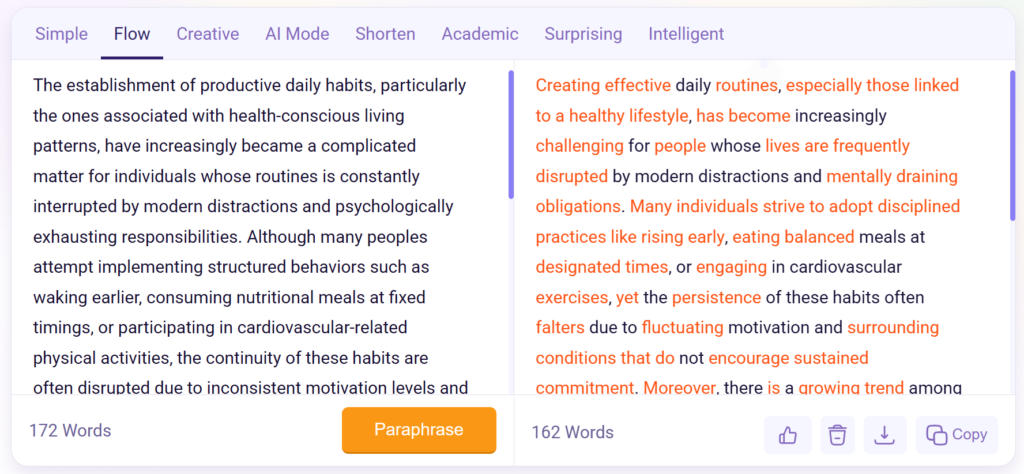
If your content has grammar issues and unclear sentences, use the flow mode. It fixes sentence structure and makes the text easier to read.
If you want to change the tone of your content, use the formal or creative mode depending on your need.
Selecting the wrong mode gives you results that do not match your content goals. So before you paste your text and hit the button, check which mode fits your purpose. That one small step saves you a lot of editing time later.
Here is a practical example of fixing sentence structure using the flow mode of the AI paraphraser:
Many writers paste their entire article into the paraphrasing tool at once. The tool processes it and gives back a fully paraphrased version. It looks convenient. But the results are usually inconsistent.
A better approach is to paraphrase in small parts. Paste one paragraph, check the result, and move to the next. This way, you have full control over each section of your content.
It also helps you catch errors quickly. If one paraphrased paragraph does not match the tone of your content, you can fix it right there or rephrase the entire paragraph.
Some users copy the paraphrased output directly without looking at it carefully. That is where they lose the quality.
Good paraphrasing tools, like the one we selected, have an interactive feature. After paraphrasing, it highlights certain words in different colors.
Upon clicking these colored words, it shows you multiple synonyms of that particular word. You can pick the one that fits your sentence best.
Here is an example:
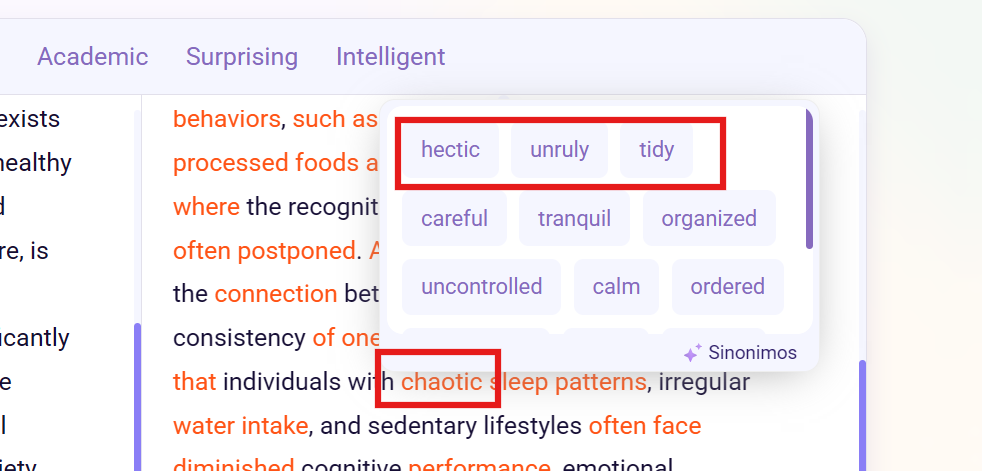
So, instead of copying the output as it is, review the content carefully. Then actively choose the suitable word for any inconsistent term that breaks the flow or disrupts the readability.
Paraphrasing in small chunks gives you better control. But it comes with one problem. Each chunk is paraphrased separately. So when you put them all together, the flow between paragraphs sometimes breaks. One paragraph ends on a certain point, and the next one starts differently. It does not feel like one connected piece of writing, which affects the readability.
That is why proofreading the full content after paraphrasing is important. Read it from start to finish. Check where the flow breaks. Fix the transitions between paragraphs so the content reads smoothly.
Also, go through the content and add your personal touch. Change a sentence that does not sound like you. Add a personal example where needed. Adjust the tone to match your usual style.
The output quality of any AI paraphrase tool greatly depends on the way you use it. Some users paste the full text and copy the output blindly. This way, the results still feel robotic and disconnected.
The right approach is to choose the correct paraphrasing mode first. Paraphrase in small chunks and actively select the best synonyms using the interactive features. Then, proofread the full content for flow issues and personalize it to match your tone.
Following these steps takes a little more time. But the content you get at the end is clean, readable, and actually useful for your audience. And that is what keeps readers on your page instead of leaving in the first 10 seconds.